如何刪除 BlueStacks 5 上的主多開引擎

這能提供什麼幫助?

使用 BlueStacks 5.4 及更高版本,您可以刪除一個或多個不想再使用的 BlueStacks 主多開來節省電腦上的資源,例如硬碟空間。

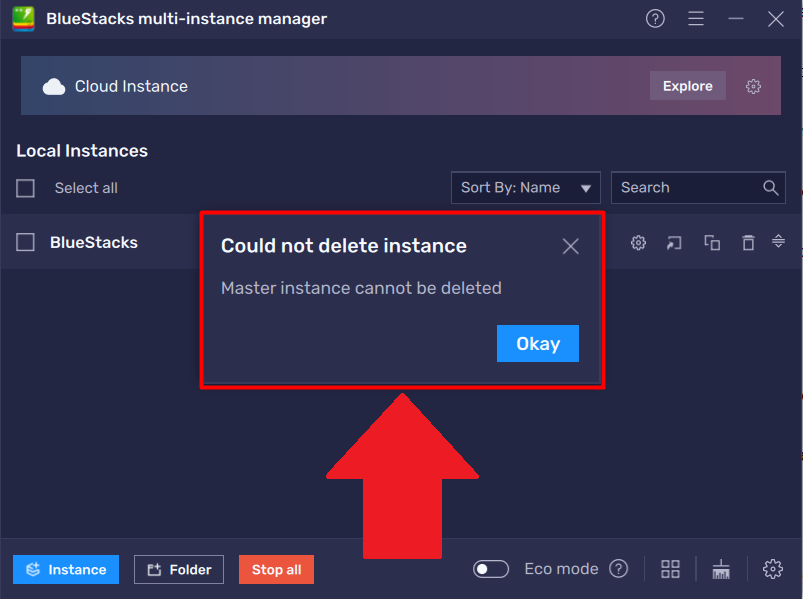
主多開是為每個BlueStacks 5 Android 版本上的的第一個多開。 為了能夠刪除主多開引擎,您必須在 BlueStacks 5 上安裝兩個或更多 Android 版本。否則,您將看到一個彈出視窗,如下所示。
1.jpg


我該怎麼做?

確保您要刪除的主多開已關閉行。 如果它正在執行,請先關閉它,然後執行以下步驟。

1. 點擊側面工具欄中的圖標打開多開管理器。

Screenshot_1.jpg

2. 在“多開管理器”視窗中,找到您要刪除的主多開,然後點擊其前面的“刪除”圖標,如下所示。

Screenshot_8.jpg

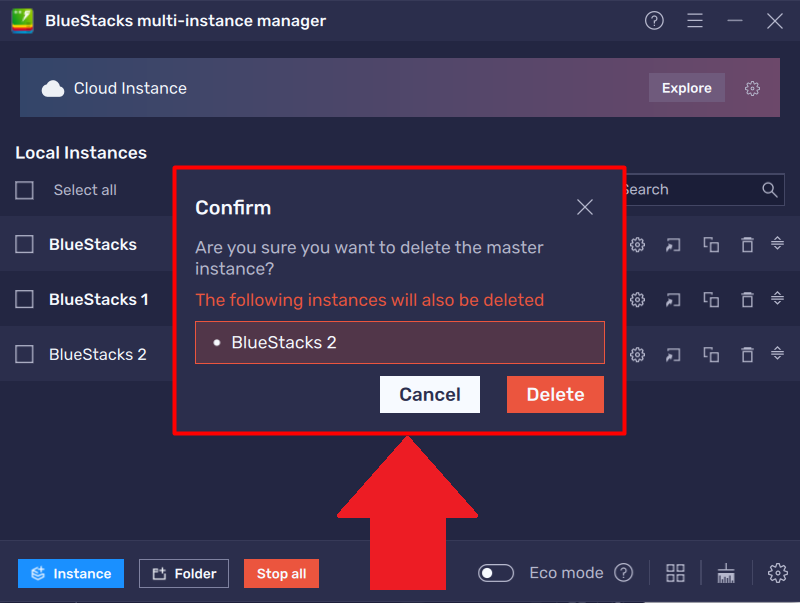
3. 然後會要求您進行確認。 點擊“刪除”以繼續。

注意:刪除 Android 版本的主多開也會刪除在您的 BlueStacks 5 上建立的該 Android 版本的所有多開。
1.jpg

現在您將能刪除選擇的主多開和其相關聯的多開。


感謝您選擇了 BlueStacks 5。我們希望您喜歡它。 祝您遊戲愉快!

這篇文章是否有幫助?
1427 人中有 65 人覺得有幫助
Reach out to us on Reddit (Join Reddit) or Discord (Join Discord) or at support@bluestacks.com with your questions.

We’d love to hear from you! Please take a moment to share your thoughts on the BlueStacks Help Center via this survey.
Subscribe to BlueStacks Weekly!
Get updates on new releases, features, and fixes. Discover trending games & enjoy exclusive gift codes!
By subscribing, I agree to receive weekly updates from the BlueStacks Help Center.
Thank you for subscribing to BlueStacks Weekly
Keep an eye on your inbox for updates on the latest features, gaming trends, bug fixes, gift codes, and much more!