ゲームパッドの検出を有効/無効にする方法

こちらではゲームパッドの検出を有効/無効にする方法をご紹介します。

BlueStacksバージョン

4.90.0.1046以降のすべてのバージョン

地域

すべての地域

手順:

  1. BlueStacksの画面右上部にある歯車のアイコンをクリックします。
  2. メイン項目の「環境設定」を選択します。
  3. サブ項目の「環境設定」を選択します。
  4. ゲームパッド使用時は以下の画像のように「ゲームパッドの検出を適用する」の左のチェックボックスをオンにし、使用しない際はチェックを外します。
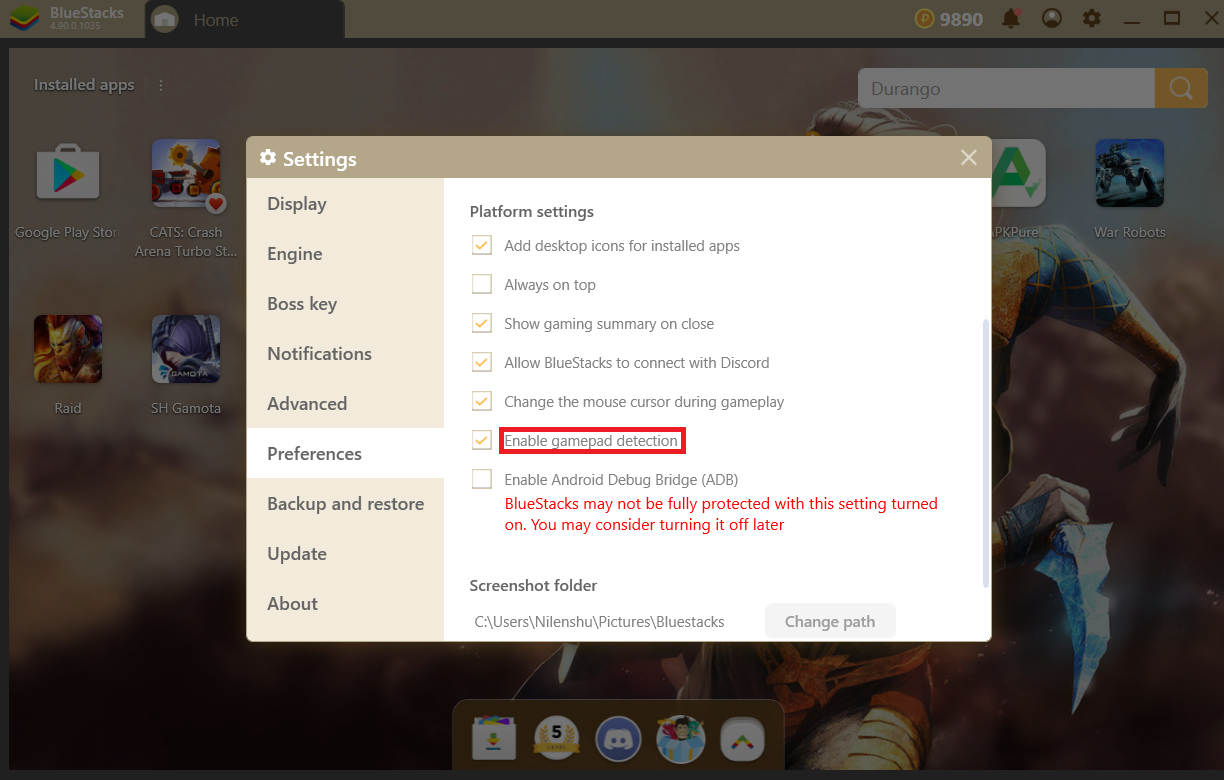
    Gamepad_detection.png

いつもBlueStacksをご利用いただき、誠にありがとうございます。ご不明な点がございましたら、support at bluestacks dot com.までお知らせください。どうぞ宜しくお願いいたします。

最終更新日 :2019年5月22日

この記事は役に立ちましたか?
585人中93人がこの記事が役に立ったと言っています
Reach out to us on Reddit (Join Reddit) or Discord (Join Discord) or at support@bluestacks.com with your questions.

We’d love to hear from you! Please take a moment to share your thoughts on the BlueStacks Help Center via this survey.
Subscribe to BlueStacks Weekly!
Get updates on new releases, features, and fixes. Discover trending games & enjoy exclusive gift codes!
By subscribing, I agree to receive weekly updates from the BlueStacks Help Center.
Thank you for subscribing to BlueStacks Weekly
Keep an eye on your inbox for updates on the latest features, gaming trends, bug fixes, gift codes, and much more!