การตั้งค่ากราฟฟิกในเพื่อเล่น Rohan M อย่างลื่นไหล

img1.png

เพื่อการเล่น Rohan M ที่ลื่นไหลและประสบการณ์ที่ดีกว่าเดิมบน BlueStacks คุณสามารถตั้งค่ากราฟฟิกเพื่อให้เกมรองรับที่ FPS 60 จากเดิมที่ FPS 30 ดังนี้

ไปที่ตำแหน่งตามรูปเพื่อตั้งค่า
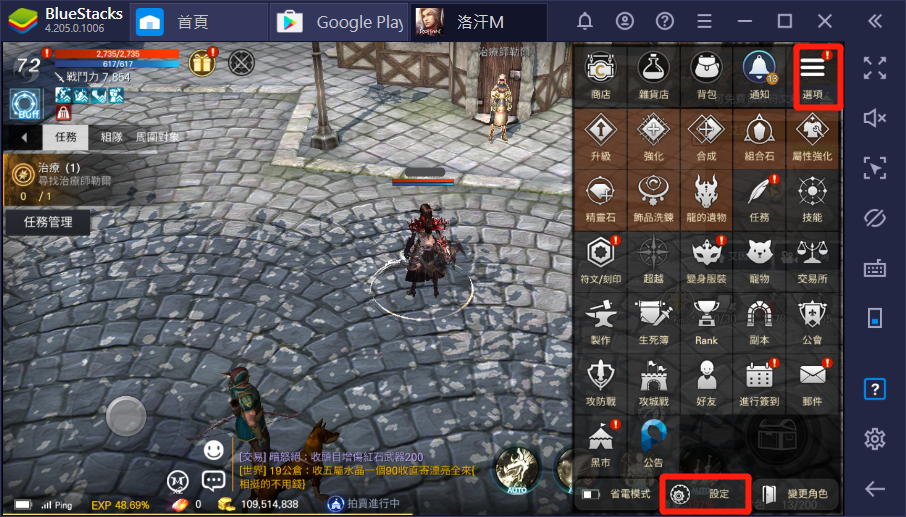
mceclip0.png

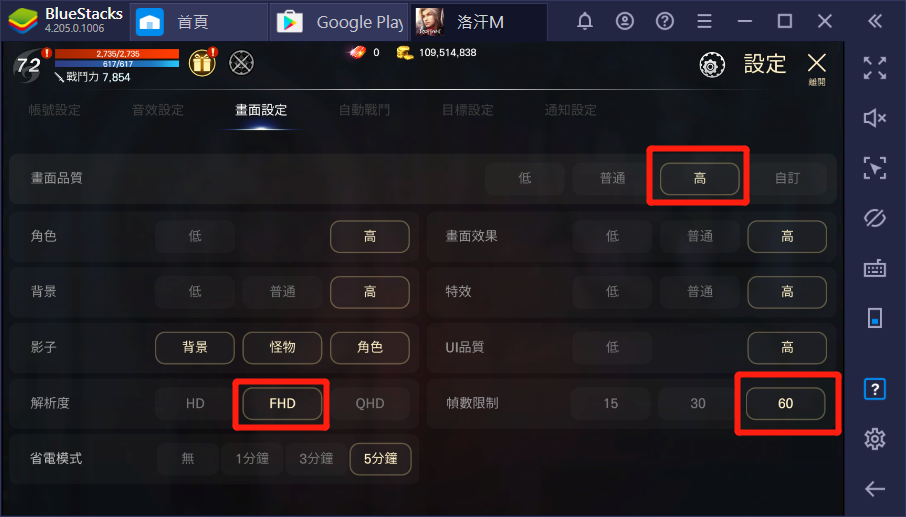
เลือก FHD และเลือกให้รองรับ FPS 60

mceclip1.png

เพียงเท่านี้คุณก็จะได้รับประสบการณ์การเล่นที่ลื่นไหลกว่าเดิมในเกม Rohan M เมื่อเล่นผ่าน BlueStacks


บทความนี้มีประโยชน์หรือไม่
11 จาก 12 เห็นว่ามีประโยชน์
Reach out to us on Reddit (Join Reddit) or Discord (Join Discord) or at support@bluestacks.com with your questions.

We’d love to hear from you! Please take a moment to share your thoughts on the BlueStacks Help Center via this survey.
Subscribe to BlueStacks Weekly!
Get updates on new releases, features, and fixes. Discover trending games & enjoy exclusive gift codes!
By subscribing, I agree to receive weekly updates from the BlueStacks Help Center.
Thank you for subscribing to BlueStacks Weekly
Keep an eye on your inbox for updates on the latest features, gaming trends, bug fixes, gift codes, and much more!