Game Highlights
Step into the fast-paced world of Mobile Legends: Bang Bang, the globally popular 5v5 multiplayer online battle arena (MOBA) where teamwork, strategy, and quick reflexes decide the winner.
Choose from a huge roster of heroes, including Tanks, Mages, Assassins, Fighters, Marksmen, and Supports. Battle across a classic three-lane MOBA map filled with jungle monsters, towers, and epic team fights. Matches are quick, matchmaking is fast, and the action never stops.
When you play Mobile Legends: Bang Bang on BlueStacks 5, you gain smoother performance, keyboard and mouse controls, and powerful tools that help you dominate every match.
Play Mobile Legends: Bang Bang on PC
Jump to a section:
NOTE: Please ensure you're on the latest version of BlueStacks 5 for the best experience.
Why play Mobile Legends: Bang Bang on BlueStacks 5
Playing Mobile Legends: Bang Bang on PC with BlueStacks 5 gives you more precision, smoother performance, and powerful features designed to improve your gameplay experience. Instead of relying on touchscreen controls, you can use keyboard and mouse inputs to react faster and aim more accurately in intense team fights.
- Macros: Record a sequence of actions and trigger them with a single key. This lets you automate repetitive gameplay actions and focus on strategy.
- MOBA Mode: Play like a traditional PC MOBA using keyboard and mouse controls. Enjoy faster reactions and precise skill shots for competitive matches.
- Multi-Instance Sync: Run multiple game instances and synchronize actions across them. Perfect for managing multiple accounts.
- Script Feature: Automate repeated actions using custom scripts. Simply open Advanced Game Controls and run your script.
- Multi-Instance: Play Mobile Legends from several accounts simultaneously on one PC.
- Eco Mode: Reduce resource consumption while the game runs in the background.
- Real-Time Translation: Translate in-game text instantly so you can communicate with players from around the world.
- High FPS Gameplay: Experience ultra-smooth gameplay with higher frame rates for faster and more responsive matches.
How to Download and Install Mobile Legends: Bang Bang on BlueStacks 5
To download Mobile Legends: Bang Bang on BlueStacks 5:
Launch BlueStacks 5 ➔ Use the search bar on the home screen or Open BlueStacks Store and search for the game ➔ Select the relevant search result and click on "Install From Google Play."
For a more detailed walkthrough and some alternative methods, you can take a look at this article.
All about Gameplay
Gameplay Overview
Mobile Legends: Bang Bang is a fast-paced MOBA where two teams of five players battle to destroy the enemy base. Each team fights across three lanes while defending towers, defeating jungle monsters, and coordinating attacks. The objective is simple. Push through enemy defenses and destroy the core before the opposing team does. At the beginning of your journey, the game guides you through tutorials. Completing these tutorials is recommended because they introduce the basic mechanics, such as movement, attacking, and skill usage. You also receive Battle Points, which are used to unlock heroes and other upgrades.
Game Modes
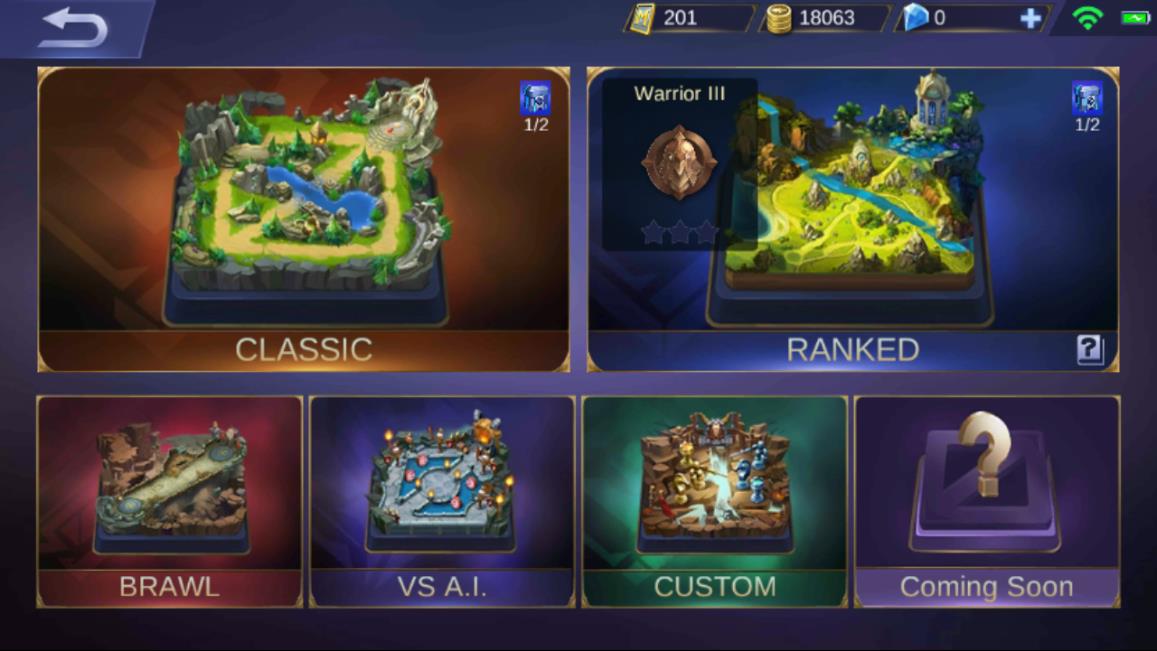
Mobile Legends includes several game modes that unlock as you level up. By level 8, most core modes become available. Each mode offers a slightly different gameplay style but maintains the same strategic focus.
- Classic: Casual matches where players practice heroes and strategies.
- Ranked: Competitive matches where you climb ranks and test your skills.
- Brawl: Fast one-lane battles with random heroes.
- Custom: Private matches for practice or fun with friends.
Heroes and Roles
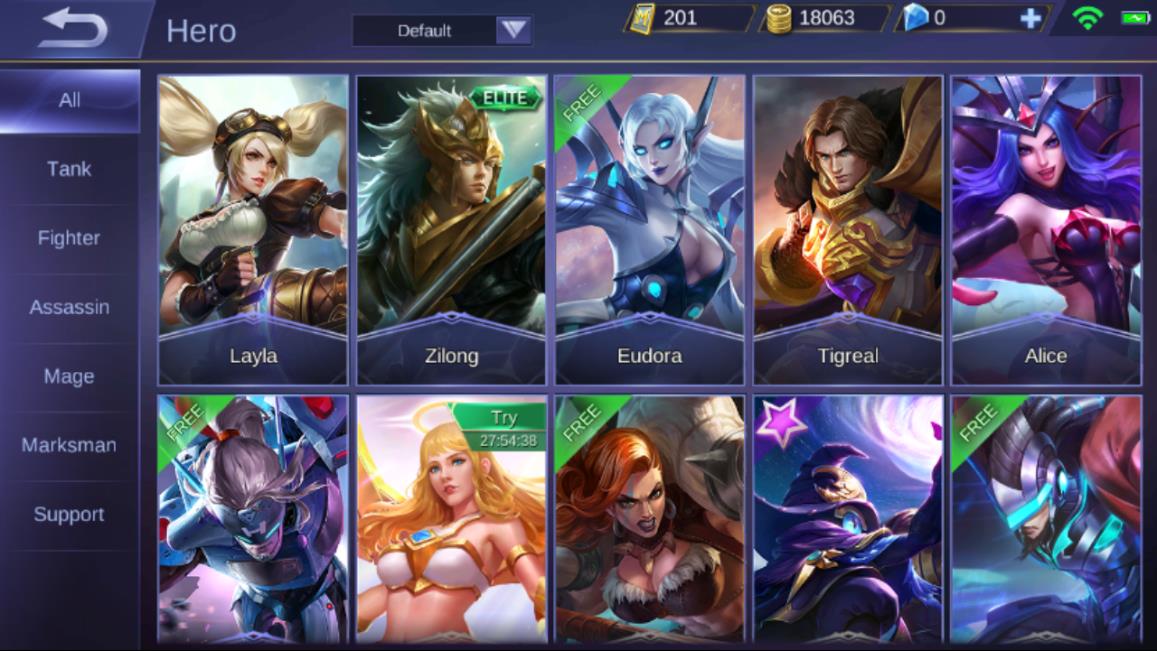
Mobile Legends features a large roster of heroes, each with unique abilities and roles. Understanding these roles is important for team balance and strategy.
- Tank: Frontline heroes with high health who absorb damage.
- Fighter: Balanced heroes capable of dealing damage and surviving fights.
- Assassin: High burst damage heroes that eliminate priority targets quickly.
- Mage: Powerful ranged spellcasters who deal magical damage.
- Marksman: Ranged physical damage dealers who become stronger later in the game.
- Support: Heroes who heal, protect, and assist teammates.
Preparation and Builds
Before entering a match, players can configure several gameplay elements from the Prep section:
- Emblems: Provide stat bonuses tailored to hero roles.
- Battle Spells: Special abilities like healing or teleportation.
- Gear Builds: Pre-selected item builds that can be used during matches.
- Quick Chat: Short commands to communicate with teammates.
Understanding your hero skills and item builds is extremely important. Items can increase damage, defense, healing effects, and movement speed. A balanced build helps your hero perform effectively in different combat situations.
Cast Modes
BlueStacks introduces powerful MOBA Cast Modes that help you use skills more efficiently.
- Manual Cast: Aim skills precisely using the mouse.
- Quick Cast: Release the key to instantly cast skills.
- Auto Cast: Automatically targets nearby enemies.
Manual cast provides the most precision, while quick and auto cast allow faster reactions during intense fights.
Early Game Strategy
During the early game, focus mainly on farming. Farming means defeating minions to earn gold and experience. The player who farms efficiently gains stronger equipment earlier and can dominate the lane.
- Prioritize last-hitting minions for maximum gold.
- Stay behind your minion wave to avoid unnecessary damage.
- Avoid chasing enemies too far from your tower.
Mid Game Strategy
After reaching level 4 and unlocking more abilities, the game becomes more aggressive. At this stage, players begin to fight for map control and objectives.
- Start pressuring enemy heroes on your lane.
- Coordinate with teammates for ganks.
- Secure jungle objectives and neutral monsters.
Late Game Strategy
In the late game, teamwork becomes the deciding factor. Team fights are frequent, and every decision matters.
- Focus on destroying enemy towers.
- Stick together with teammates during fights.
- Target enemy damage dealers first.
Key Controls
You can play Mobile Legends: Bang Bang on BlueStacks 5 using two types of control schemes:
- WASD Controls: Simple keyboard movement with mouse actions.
- MOBA Controls: Advanced controls similar to PC MOBAs such as DOTA 2 and League of Legends.
If you want to change your control scheme, open the Game Controls menu from the Side toolbar. For more details, click here.
How can I play using the WASD controls?
You can use the following controls to play Mobile Legends: Bang Bang with the WASD control scheme.
NOTE: By default, the WASD control scheme is selected for playing Mobile Legends: Bang Bang.
| Key | Action |
| Move around | |
| Cast a spell | |
| Cancel a spell | |
| Basic attack | |
| Aim | |
| Add skill points to a skill | |
| Quick buy items |
How can I play using the MOBA controls?
You can use the following controls to play Mobile Legends: Bang Bang with the MOBA control scheme.
| Key | Action |
| Move the character to that point | |
| Move around | |
| Cast a spell | |
| Cancel a spell | |
| Basic attack | |
| Aim | |
| Add skill points to a skill | |
| Quick buy items |
For more details, click here.
Minimum System Requirements
To enjoy the game without lag, make sure your PC meets these requirements:
- OS: Windows 7 or newer, macOS 11 or newer
- Processor: Intel, AMD, or Apple Silicon (M1 to M4)
- RAM: At least 4GB
- Storage: 10GB free disk space
- Permissions: Administrator access
- Graphics: Updated drivers from Microsoft or the GPU manufacturer
Recommended Settings
For the best gameplay experience on BlueStacks 5, use the following settings:
- Performance Mode: High Performance
- CPU allocation: High (4 Cores)
- Memory allocation: Enhanced (4 GB) or higher
- Frame Rate: 60 or 120 FPS
- Resolution: 1920 x 1080
These settings provide smooth gameplay and faster response times during intense team fights.
How to play Mobile Legends: Bang Bang at 120 FPS on BlueStacks 5
You can achieve smoother gameplay by enabling 120 FPS using the following steps:
BlueStacks Settings
- Launch BlueStacks 5 and open the Settings menu.
- Select the Phone tab and under Device profile, click on Create a custom profile with the following details.
- Manufacturer: Xiaomi
- Brand: Xiaomi 11T Pro
- Model: 2107113SG
- Click on Save changes to create this device profile on your BlueStacks 5.
In-game Settings
- Launch Mobile Legends: Bang Bang from your BlueStacks 5 home screen.
- Click on the gear icon at the top right corner of your screen to access the in-game settings menu.
- Set Refresh Rate to Ultra, as shown below.
- Once you have made the changes, click on the back button to go back to the game lobby.
You can now enjoy smoother battles at 120 FPS.
Detailed Guides
- Cast Modes Explained
- How to Master Top Lane
- How to Win a Losing Game
- Marksman Guide
- Best Hero Combos
For more guides and gameplay tips, visit the BlueStacks gaming blog.
Need Help?
If you run into any issues while playing Mobile Legends: Bang Bang on BlueStacks 5, try the solutions below:
- Matchmaking errors: Go to in-game Settings → Network tab → Toggle Speed Mode ON then OFF. Click here
- Game not launching: Clear the app cache or update BlueStacks to the latest version.
- Low FPS or lag: Allocate more RAM and CPU cores in BlueStacks settings or lower in-game graphics.
- Game not appearing in Play Store: Install the APK manually by dragging it into BlueStacks.
- Other issues? Visit the BlueStacks Help Center or submit a problem report.
Mobile Legends: Bang Bang delivers intense MOBA action with quick matches, diverse heroes, and strategic team fights. Playing on BlueStacks 5 enhances the experience with better controls, smoother performance, and powerful gameplay tools.
So what are you waiting for? Build your dream team, master your heroes, and dominate every match on BlueStacks 5!
Thank you for choosing BlueStacks 5. We hope you enjoy using it. Happy Gaming!