Purpose
Scripts คือชุดของการกระทำ (เช่น การกดปุ่ม, คลิกเมาส์, ดีเลย์) ซึ่งตั้งค่าให้ทำงานผ่านุ่มควบคุม เป็นฟีเจอร์ใหม่ที่ช่วยเพิ่มความหลากหลายให้ระบบ keyboard control และช่วยเพิ่มประสิทธิภาพในการใช้งาน
Benefits
ช่วยให้คุณสามารถสร้างสคริปท์และใช้งานได้
Audience
ผู้ใช้ทุกคนที่ใช้งาน BlueStacks.
BlueStacks versions affected
BlueStacks version 4.140 ขึ้นไป
Geos affected
ทุกพื้นที่
ก่อนอื่นขอเชิญชมวีดีโอแนะนำระบบสคริปท์บน BlueStacks.
คำสั่งต่างๆที่ใช้งานได้บน BlueStacks:
|
Keyword |
Syntax |
Short Description |
|
# |
# this is a comment |
Comments begin with #. Everything until the end of the line is considered comment and is ignored. |
|
keyDown |
keyDown key |
Key is pressed and is not released until the keyup is encountered for the same key. |
|
keyDown2 |
keyDown2 key |
Key is pressed and is not released until the keyup is encountered for the same key. |
|
keyUp |
keyUp key |
Key is released. Mapping is executed if one exists; otherwise, key up input is forwarded to android. |
|
keyUp2 |
keyup2 key |
Key is released. Mapping is not executed and key up input is forwarded to android. |
|
mouseDown |
mouseDown x y |
Mouse left button is pressed at location x, y. All locations are in screen percentages so that the same script can work across different resolutions. |
|
mouseUp |
mouseUp |
Mouse left button is released. No coordinates are required. |
|
mouseMove |
mouseMove x y |
Mouse moves to new location x, y |
|
touch |
touch x1 y1 x2 y2 x3 y3 |
Touch input with the current set of touchpoints specified. Series of touch commands can be used to create arbitrary multi-touch input. |
|
text |
text “text” |
Send text input to android. This can be in any language. The format should be utf8. |
|
mouseWheel |
mouseWheel x y d |
Send mousewheel event to keymapping which will convert it to zoom or scroll accordingly |
|
wait |
wait msecs |
Waits for the specified number of milliseconds before executing the next command. |
Higher Level Primitives.
|
Keyword |
Syntax |
Short Description |
|
tap |
tap x1 y1 x2 y2 … xn yn delay |
This does a tap gesture. Single or multiple touchpoints can be specified. The touchpoint(s) are held for a specified delay. If the delay is not specified it is assumed to be 50msec. |
|
swipe |
swipe x1 y1 x2 y2 … xn yn delay |
Do a swipe gesture. Multiple points may be specified which the swipe goes through. |
|
loop / loopEnd |
loop n |
Commands following loop command until loopEnd are executed n times. |
|
onRelease |
onRelease |
This provides finer control over the execution of the script. A different set of commands can be provided for executing when the trigger key is pressed and released. |
|
enterShoot |
enterShoot |
Enter shooting mode used to play FPS games. If a Pan control does not exist in the current scheme this is ignored. If shooting mode is already enabled this has no effect. |
|
exitShoot |
exitShoot |
Exit shooting mode. If a Pan control does not exist in the current scheme this is ignored. If shooting mode is disabled this is ignored. |
|
toggleShoot |
toggleShoot |
Toggle shooting mode. If a Pan control does not exist in the current scheme this is ignored. |
การสน้างสคริปท์
1) เปิดแอพหรือเกมที่คุณต้องการ
2) คลิกที่ keyboard control UI ด้านข้างจอตามรูป
3) คลิกที่ปุ่ม Edit บริเวณมุมขวาบน จากนั้นจะมีกล่องข้อความตามรูป
4) คลิกที่ Advanced settings บริเวณมุมขวาล่าง
5) หลังจากเปิดหน้าต่าง Game Controls ลากปุ่ม script button ไปวางที่ไอคอนถุง มุมซ้ายล่างตามรูป
ที่ TAB สามารถใส่คำสั่งของสคริปท์ได้
6) คลิกที่ไอคอน ที่ด้านล่างเครื่องหมาย "<\>" ให้พิมพ์คำสั่งของสคริปท์ที่ต้องการ
7) จากนั้นคลิกที่ "<\>" จะมีเคอร์เซอร์ปรากฏบนหน้าจอ เมื่อนำเมาส์ไปชี้จะแสดงรายละเอียด
เมื่อเสร็จสิ้นแล้วคลิกที่ไอคอนรูปถุง
8) คุณสามารถพิมพ์คำสั่งได้เมื่อเคอร์เซอร์แสดงบนหน้าจอ
ตัวอย่างคำสั่ง
tap หมายถึงเมื่อเรากด TAB จะแตะที่ไอคอนถุง
exitShoot หมายถึงเมื่อเรากด TAB จะออกจาก Shooting mode
เมื่อใส่คำสั่งแล้วกด Done
9) คลิกที่บันทึก
10) เมื่อมีการบันทึกจะมีหน้าต่างแสดงขึ้น คุณสามารถปิดคอนโซลควบคุมเกมได้
11) สามารถใช้งานในเกมได้เลย
ตามภาพด้านล่างผู้เล่นอยู่ใน Shooting Mode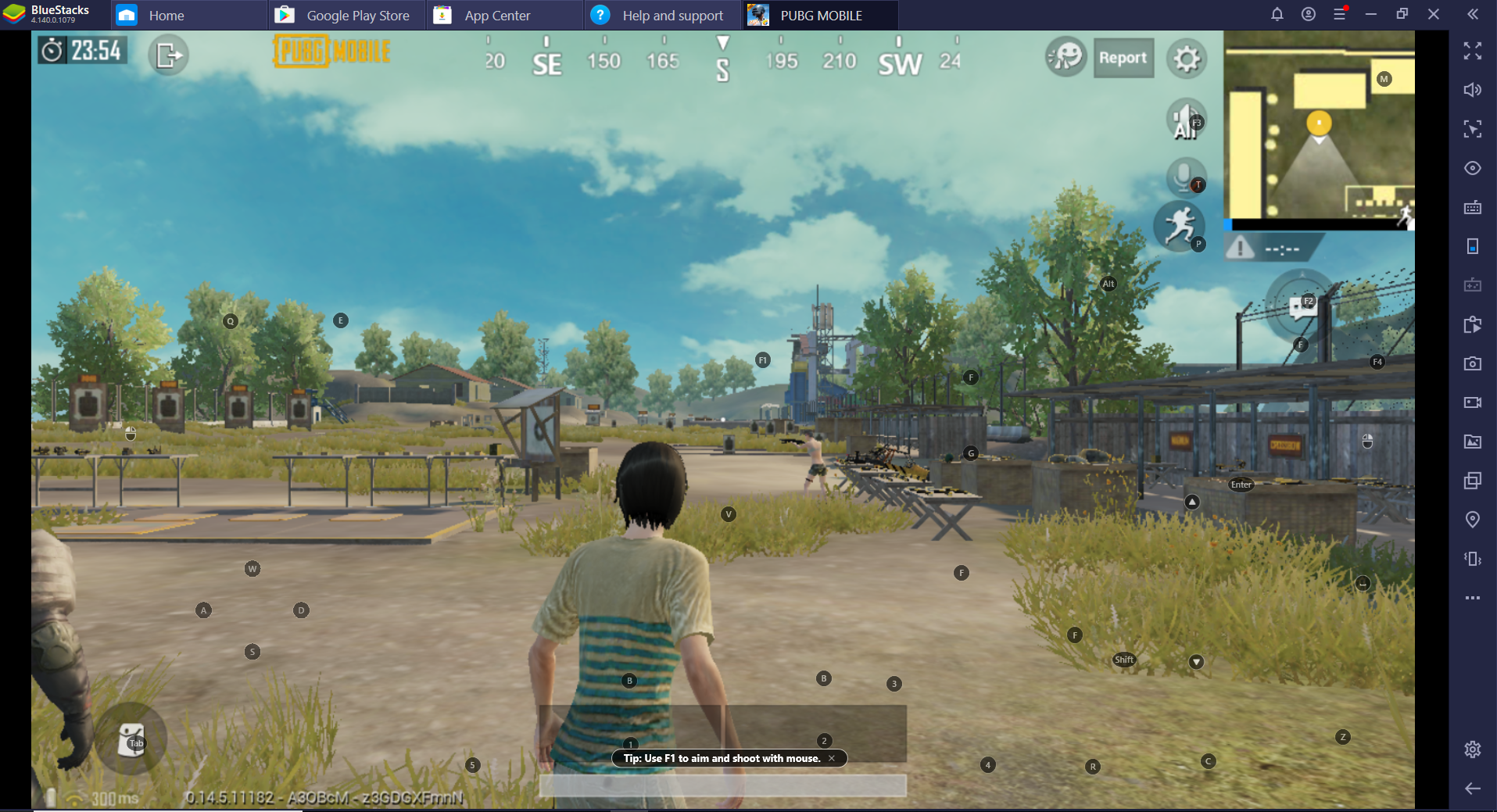
เมื่อกด TAB ผู้เล่นจะออกจาก Shooting mode และเปิดกระเป๋าเก็บของ
เรามีความยินดีเป็นอย่างยิ่งที่คุณเลือกใช้ BlueStacks เพื่อเล่นเกมของคุณ เราหวังเป็นอย่างยิ่งว่าคุณจะสนุกสนานเพลิดเพลินกับการเล่นเกมครั้งนี้ หากมีข้อสงสัยกรุณาติดต่อ support at bluestacks dot com. ขอขอบพระคุณ