Purpose
สามารถใช้งาน synchronization เพื่อเชื่อมการควบคุมหลายหน้าจอใน BlueStacks 4.
Benefits
คุณสามารถควบคุมการเล่นเกม การพิมพ์ รับรางวัลในเกมหรืออื่นๆจาก หน้าจอที่เปิดใช้งานอยู่พร้อมๆกัน
BlueStacks versions affected
BlueStacks version: 4.140. ขึ้นไป
Audience
ผู้ใช้ทุกคนที่ใช้ BlueStacks 4.
Geo’s affected
ทุกพื้นที่
Steps
- คลิกที่เมนูรูป hamburger บริเวณมุมขวาบนของ BlueStacks และเลือก "Sync operations" ตามรูป
- หากคุณมีหน้า BlueStacks instance หลักเปิดอยู่, จะมีข้อความขอให้คุณ "Launch Instance manager" ตามรูปด้านล่าง
3.คุณสามารถสร้าง Instance ใหม่จาก BlueStacks multi-instance manager (อ้างอิงตามบทความนี้ BlueStacks multi-Instance manager.
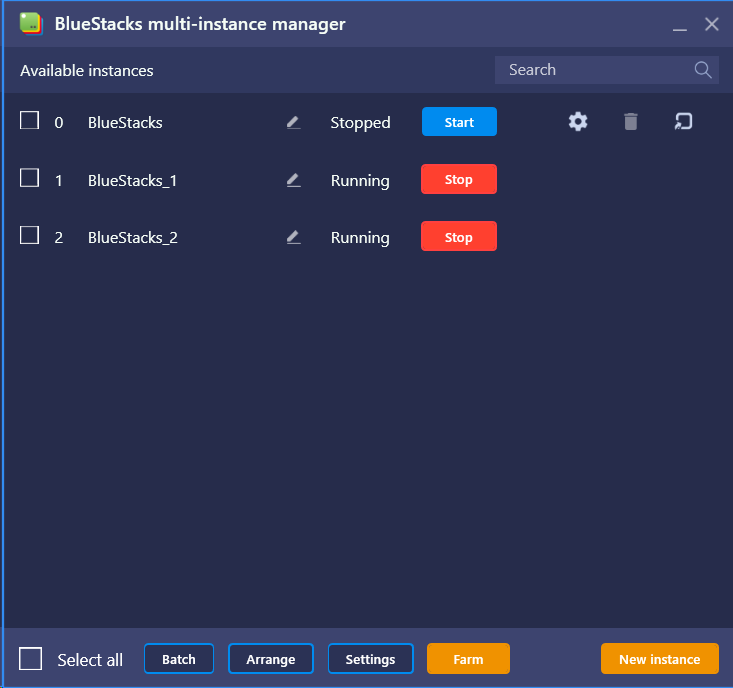
- เมื่อเปิดหลายๆ Instance ขึ้นมา, คุณจะสามารถ Sync แต่ละ Instance ให้เชื่อมต่อกันตัวอย่างเช่น, เปิดแอพบน BlueStacks หน้าจอหลักแล้วคลิก Synchroniser
- คุณจะสามารถเลือก Instance ได้และเมื่อทำการเชื่อมต่อกันด้วยปุ่ม "Sync selected" ในตัวอย่างนี้เราจะเลือกเชื่อมกับ BlueStacks_4 instance.
- ทั้งสองหน้าจอจะทำงานเชื่อมกัน การควบคุมที่เกิดที่หน้าจอหนึ่งจะมีผลในหน้าจอที่สองด้วย
เรามีความยินดีเป็นอย่างยิ่งที่คุณเลือกใช้ BlueStacks เพื่อเล่นเกมของคุณ เราหวังเป็นอย่างยิ่งว่าคุณจะสนุกสนานเพลิดเพลินกับการเล่นเกมครั้งนี้ หากมีข้อสงสัยกรุณาติดต่อ support at bluestacks dot com. ขอขอบพระคุณ